Code Coverage
Note
This is an experimental feature.
For ease-of-use and an alternative, you can check out the colcon mixin plugins. To setup mixin, a quick guide is available at Setting up mixin.
Setup
Via CMake flags
Firstly, compile the repository with the following flags:
colcon build --cmake-args -DCMAKE_C_FLAGS='--coverage' \
-DCMAKE_CXX_FLAGS='--coverage'
After the compilation has complete, run the pytests with coverage enabled:
colcon test --pytest-with-coverage \
--pytest-args --cov-report=term \
--event-handlers console_direct+
Via mixin
Important
Ensure that colcon mixin is installed before proceeding. Checkout the quick guide on how to setup mixin here: Setting up mixin.
This is an alternative method that uses mixin to compile
and setup the test, which would be similar to the steps
mentioned above.
To build the package:
colcon build --mixin coverage-gcc
After that, run colcon test:
colcon test --mixin coverage-pytest --event-handlers console_direct+
C++ Code Coverage
To generate the code coverage report for the cpp files, the
colcon-lcov-result plugin would be used. More details on the
plugin could be found
here.
Install the plugin via apt:
sudo apt install lcov                        # Prerequisite
sudo apt install python3-colcon-lcov-result  # The colcon plugin
After the plugin is installed, the report could be generated via the following command:
colcon lcov-result
A new directory would be generated and the report would be available in
the lcov/ directory as index.html.
Python Code Coverage
For python files, the report is generated inside the
build/<package-name>/coverage.html/ directory as index.html.
Example
We would be using the packml_ros2 in this example. Let’s git clone the repository:
git clone https://github.com/1487quantum/packml_ros2.git ~/packml_ros2       # Clone the repo
cd ~/packml_ros2                                                             # Enter the dir
Let’s compile the files with the coverage flag:
colcon build --cmake-args -DCMAKE_C_FLAGS='--coverage' -DCMAKE_CXX_FLAGS='--coverage'
After that, run the test(s):
colcon test --pytest-with-coverage --pytest-args --cov-report=term --event-handlers console_direct+
Python
The python code coverage report would be generated in the
build/<package_name>/ directory. Let’s take a look at the
packml_plc as an example, which contains only python files:
cd ~/packml_ros2/build/packml_plc/
The directory structure would look something like this:
$ ls
build                                  colcon_test.rc  packml_plc.egg-info
colcon_build.rc                        coverage.html   pytest.xml
colcon_command_prefix_setup_py.sh      coverage.xml
colcon_command_prefix_setup_py.sh.env  install.log
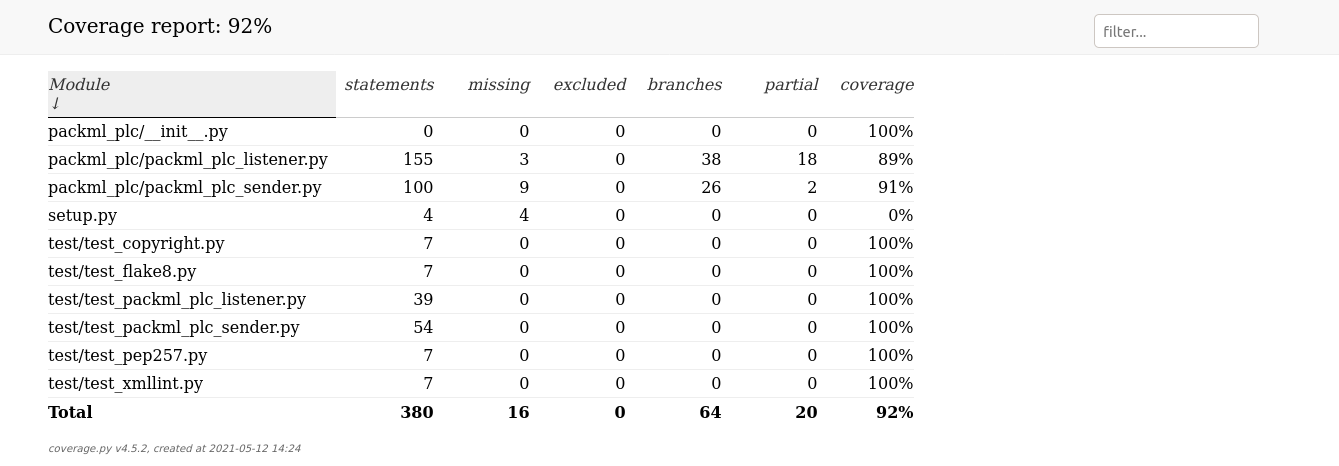
The report summary could be found in either the
coverage.html/index.html directory, or the pytest.xml.
The index.html code coverage summary would look similar to this:
C++
Moving on to the code coverage of the cpp files, ensure that lcov and
colcon-lcov-result has been setup. We would be looking at packml_sm
for this example, let’s return to the root directory first:
cd ~/packml_ros2
The code coverage summary of the test would be printed on the terminal previously. However, the cpp files require an additional step to generate the code coverage summary report. The files could be generated via the following command:
colcon lcov-result
The lcov directory would be created and the code coverage report
would be stored inside the directory as index.html.

Note
Do note that only the code coverage for the python files, additional steps are required to obtain the code coverage report for the C++ files.